
Yes, you can set up a Google Business Profile yourself — and you should. I've been researching Google Business Profiles for years, and the setup is completely free, takes about an hour, and it's designed for business owners to handle on their own.
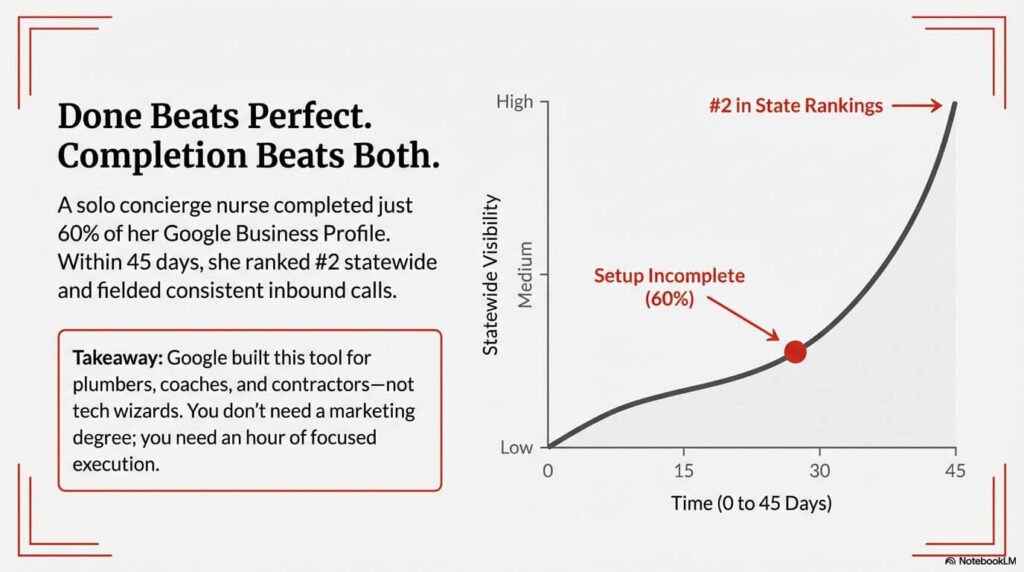
Here's what'll blow your mind: I have a client — a concierge nurse in North Carolina — who only completed 60% of her Google Business Profile setup. In less than 45 days, she was getting calls and ranking #2 for the entire state. Imagine what happens when you actually finish the whole thing.
The Short Answer: Yes, You Can (And Should) Set It Up Yourself
Google didn't build this tool for marketing agencies or tech wizards. They built it for you — the plumber, the consultant, the coach, the contractor who needs to be found online without breaking the bank.
You don't need a computer science degree or a marketing budget. You need an hour of focused time and the willingness to fill out forms completely.
Even that concierge nurse with her 60% setup was crushing her competition. But here's what I've learned after 35+ years in marketing: consistency beats perfection, but completion beats both.
What You Need Before You Start
Before you touch that keyboard, get your ducks in a row.
First, nail down your NAP — Name, Address, Phone number. Write them down exactly as they appear everywhere else online. I mean exactly. If your website shows "(555) 123-4567" but you're thinking of typing "555-123-4567" — stop. Pick one format and stick with it everywhere.
Prepare your business category and description ahead of time. Google has thousands of categories, and picking the right one matters. Don't get creative here — pick what your customers would search for.
Have high-quality photos ready to upload. Not just your logo. Pictures of your work, your space, your team in action. Google loves visual content, and so do your potential customers scrolling through their options at 10 PM.
Step-by-Step: Setting Up Your Google Business Profile
Head to Google Business Profile and claim your business. If it already exists (Google creates profiles automatically sometimes), claim it. If not, create it from scratch.
Fill out every single field completely. I don't care if it feels repetitive or unnecessary. Google is building a picture of who you are and what you do. Empty fields tell Google you don't care enough to finish what you started.
The verification process comes next. Google will send you a postcard, call your phone, or offer instant verification. Don't get cute and try to speed this up with fake addresses. Google's smarter than that, and getting caught means starting over with a penalty.
Upload those photos you prepared. Behind-the-scenes shots, work in progress, happy customers (with permission). Unlike Facebook and a bunch of the other platoforms, Google Business Profile encourages you to link back to your website. Use that power.
Create your first post while you're there. Announce a special, share a recent project, link to a blog article. You're training Google that this is an active business worth paying attention to.
The Biggest Mistakes I See Business Owners Make
Here's where most people mess up: inconsistent information across platforms.
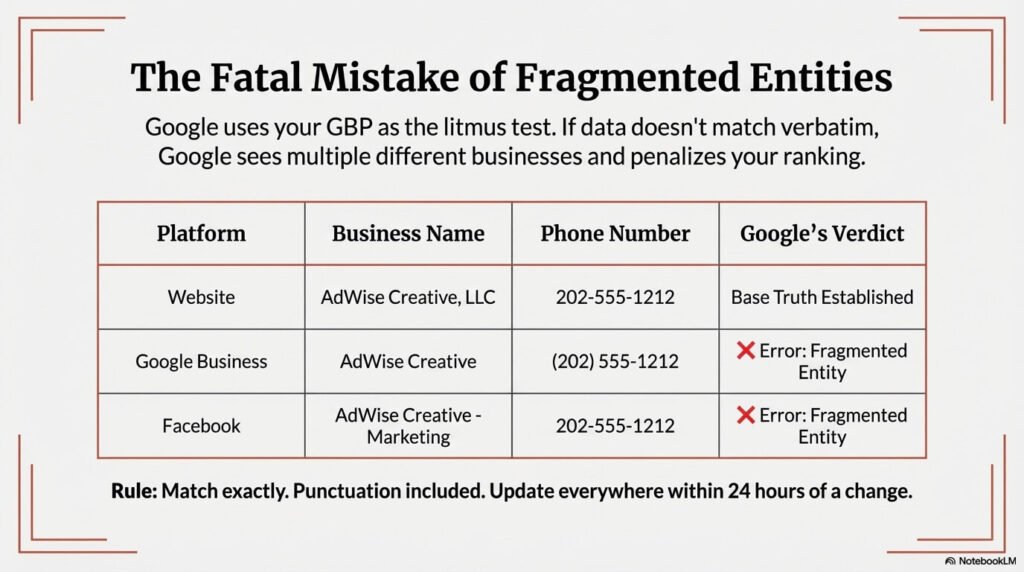
Your Google Business Profile says "AdWise Creative." Your website header says "AdWise Creative, LLC." Your Facebook page says "AdWise Creative - Marketing for Service Businesses." Google sees three different businesses.
This is the foundation of your business information online. Google will refer to your GBP as the litmus test for everything it finds about you/your business. Whatever you write here needs to match — verbatim, punctuation, formatting — across the board.
I've seen businesses write their phone number as (202) 555-1212 on their Google profile but 202-555-1212 on their website. Google sees those as different numbers. If there's confusion, Google will skip you or knock you down a few positions.
The second killer mistake? Not updating every source when changes are made. You move offices, change your phone number, add a service — that information needs to be identical everywhere within 24 hours.
How Hard Is It to Create a Google Business Profile?
The initial setup takes about an hour if you're focused and have your information ready. But here's the reality: ongoing maintenance happens weekly.
There's a learning curve. The interface isn't always intuitive, and Google changes things without warning. But it's manageable. I've watched contractors, coaches, and consultants figure it out while running their businesses.
The hardest part isn't the setup — it's the discipline of keeping it updated. New photos, fresh posts, responding to reviews, updating hours during holidays. This becomes part of your weekly routine, like checking your bank balance or scheduling client calls.
But remember my concierge nurse client? Even her 60% completion was enough to dominate her market. Perfect isn't the enemy of good here — it's the enemy of done.
Insider Tips Most Business Owners Don't Know
Here's something that'll change how you think about your Google Business Profile: Google loves fresh photos, and I mean really loves them.
Keep posting pictures occasionally — behind the scenes, projects in process, your team solving problems. While your competitors are posting the same stock photos from 2019, you're showing Google (and customers) you're active and engaged.
Here's the kicker most people miss: unlike Facebook, which wants to keep people on Facebook, Google Business Profile rewards you for linking back to your website. Facebook might restrict your reach if you link away from their platform. Google rewards it.
Got a special? Link to it. New blog article? Link to it. Just finished a video explaining your process? Link to that too. This is free traffic directly to your website, YouTube page, landing page, from the world's biggest search engine.
Your competitors probably don't know this. Most of them don’t even know this free resource even exists!! Instead, they’re treating their Google Business Profile like a digital business card instead of the marketing powerhouse it actually is.
Can I Have a Google Business Profile Without an LLC?
Yes. Sole proprietors can create Google Business Profiles without any problem.
You need a real business that serves customers — not just a side hustle you're thinking about maybe starting someday. But if you're actively working with clients, even part-time, you qualify.
Home-based businesses are completely allowed. I work from my house in Bradenton, Florida, and my profile works just fine. You can even set up service-area businesses that hide your home address while still showing your service area.
What Happens After You Set It Up
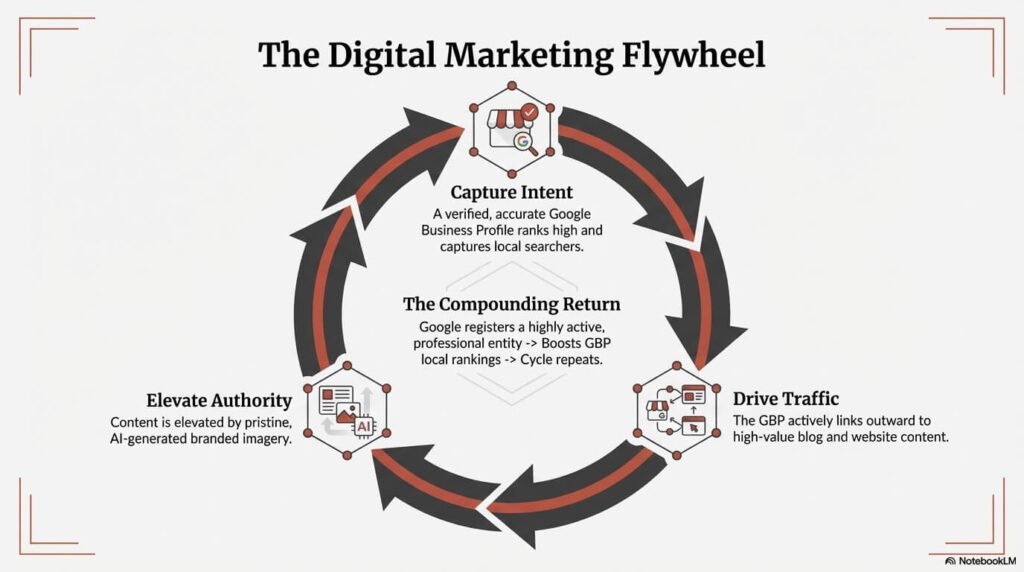
Results can start showing in as little as 45 days — I've seen it happen. But this becomes your foundation for all other marketing efforts moving forward.
Every blog post you write, every social media update, every piece of content you create — it all connects back to this profile. Regular updates and fresh content keep it working for you 24/7.
Think of it as your free, silent salesperson that never asks for a raise.
---
Ready to stop smiling in the dark? Your Google Business Profile is the first step to getting found online — and it's completely free. If you want to see how your current online presence looks to Google, check out what Google sees about your business right now.